How to fix an Xbox Series Controller that won't connect to PC
I had found recently that my Xbox controller would no longer connect to my Windows gaming PC. No amount of reinstalling bluetooth drivers or the controller or rebooting would sort it. It would try to connect, and Windows would say it failed every single time. Eventually I gave up and connected it via USB which worked mostly fine aside from having to be tethered to my PC.
I was fiddling recently and found if I removed Steam's "Xbox Extended Feature Support Driver" and rebooted the controller connects and works perfectly over Bluetooth again. You can find this in Steam>Settings>Controller.
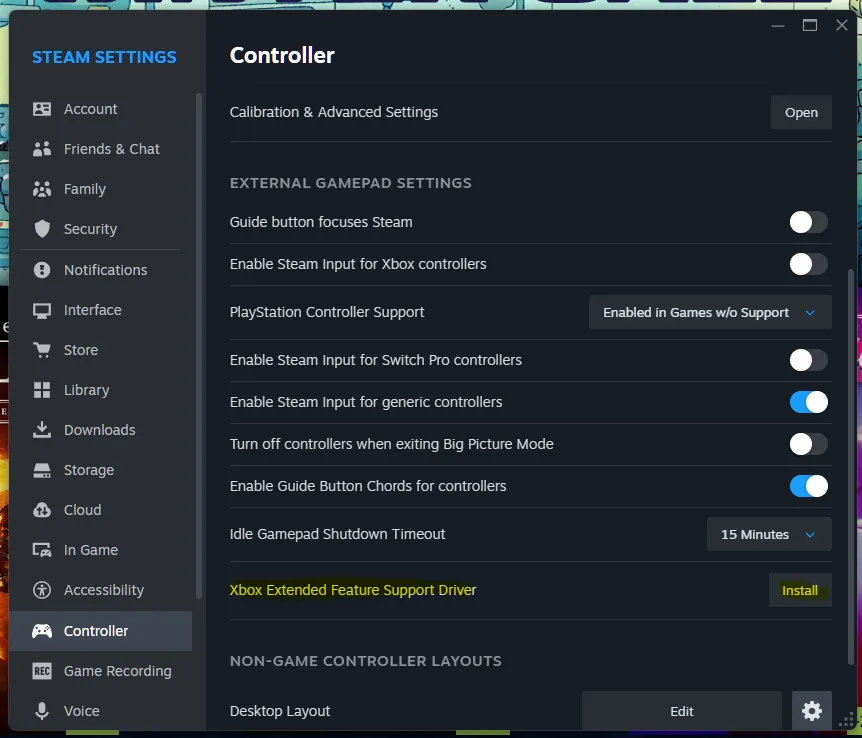
Hopefully this helps out someone pulling their hair out!