How to create a Rising Falling Temperature Trend Indicator in Home Assistant
Yet another post in my series of 'if I don't document it, I will forget how to
I recently wanted a visual indicator as to whether the temperature in our home was rising and falling. This is possible with Home Assistant but the configuration is a bit cumbersome (like most of Home Assistant, honestly...)
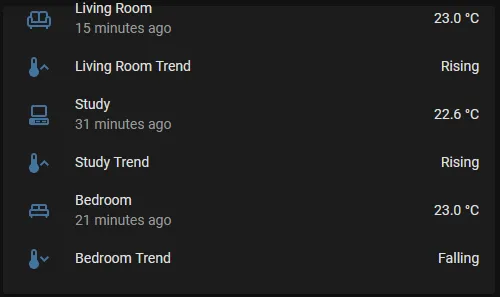
Take note of the names of the temperature sensors you want to create Rising/Falling entities for. In my case, I will be creating three for bedroom, living room, and study.
Take your three temperature sensors, and create a trend entity for each within your configuration.yaml file. Keep the names sensible!
binary_sensor:
- platform: trend
  sensors:
   trend_living_temp:
    entity_id: sensor.temperature_living_room_temperature
   trend_bedroom_temp:
    entity_id: sensor.temperature_bedroom
  trend_study_temp:
    entity_id: sensor.temperature_office_temperature
This will create an 'on/off' trend sensor which shows 'on' if the temperature is raising and off if the temperature is falling. You can set a minimum change on the trend sensor so minor fluctations are ignored, but the default configuration works for me.
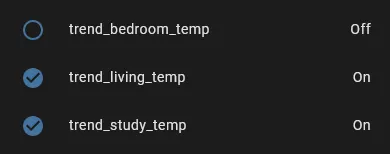
Now we will use this to create a template sensor for each new trend sensor. This will let us customise the text so it says Rising or Falling instead of On or off and also allow us to set a custom entity icon. Once again, this goes in your configuration.yaml file.
template:
- sensor:
- name: "xStudyTrend"
  state: >
   {% if is_state('binary_sensor.trend_study_temp', 'on') %}
   Rising
   {% else %}
   Falling
   {% endif %}
  icon: >
   {% if is_state('binary_sensor.trend_study_temp', 'on') %}
   mdi:thermometer-chevron-up
   {% else %}
   mdi:thermometer-chevron-down
   {% endif %}

- name: "xLivingRoomTrend"
  state: >
   {% if is_state('binary_sensor.trend_living_temp', 'on') %}
   Rising
   {% else %}
   Falling
   {% endif %}
   icon: >
   {% if is_state('binary_sensor.trend_living_temp', 'on') %}
   mdi:thermometer-chevron-up
   {% else %}
   mdi:thermometer-chevron-down
   {% endif %}

- name: "xBedroomTrend"
  state: >
   {% if is_state('binary_sensor.trend_bedroom_temp', 'on') %}
   Rising
   {% else %}
   Falling
   {% endif %}
  icon: >
   {% if is_state('binary_sensor.trend_bedroom_temp', 'on') %}
   mdi:thermometer-chevron-up
   {% else %}
   mdi:thermometer-chevron-down
   {% endif %}
If the trend sensor is 'on', then the template will return 'Rising' and set the icon to 'mdi:thermometer-chevron-up'. In all other cases, it will return 'Falling' and set the icon to 'mdi:thermometer-chevron-down'.
Make sure all your conditional statements refer to the correct sensor! You might pull your hair out for half an hour if you don't.... :)